Maybe a 'lightbox' is the set up that you want.
This way, minimal adjustments will take place everytime you shoot.
Here's an old photo of my box...


| skullbrain.org http://skullbrain.org/legacy/ |
|
| Photo lighting http://skullbrain.org/legacy/viewtopic.php?f=5&t=28329 |
Page 1 of 1 |
| Author: | Future_Man [ Mon Feb 23, 2009 10:22 am ] |
| Post subject: | Photo lighting |
I would like to have a consistent set-up to photo some toys, and really like the white backdrop with lighting (a la photos by JOE, Calvin, etc.). Details on 'how to'? |
|
| Author: | scottygee [ Mon Feb 23, 2009 10:48 am ] |
| Post subject: | Re: Photo lighting |
There are a few topics on this subject---search for "light tent" and you can find some different threads... |
|
| Author: | JAY [ Mon Feb 23, 2009 10:51 am ] |
| Post subject: | Re: Photo lighting |
Maybe a 'lightbox' is the set up that you want. This way, minimal adjustments will take place everytime you shoot. Here's an old photo of my box...
|
|
| Author: | Future_Man [ Mon Feb 23, 2009 11:41 am ] |
| Post subject: | Re: Photo lighting |
thanks all! |
|
| Author: | Kevlo9 [ Mon Feb 23, 2009 12:07 pm ] |
| Post subject: | Re: Photo lighting |
You can also make a light box super cheap that works really well. Do a google search. |
|
| Author: | kidclam [ Mon Feb 23, 2009 12:14 pm ] |
| Post subject: | Re: Photo lighting |
I just use my sketch book as a back drop, turn on my desk lamp and hone it close to the toy. The position of the lamp on the figure is the most important for me to get the right angle hitting the toy. Unless you want even lighting like Jay or Joe then you should set up something like Jay has. I don't have that much space. After the shots are taken, I then adjust the contrast and sharpness etc (I sometimes just use iPhoto's simple editing) I am not a professional at lighting but happy enough with the result... the process of toy photo shooting is so much fun and that is the most important for me. |
|
| Author: | akum6n [ Mon Feb 23, 2009 12:46 pm ] |
| Post subject: | Re: Photo lighting |
You don't really need a lightbox. I just use a sheet of thick white posterboard and lean it against the wall. That gives the 'seamless' look to the background. As for lighting, I use GE Reveal lightbulbs in the cheap aluminum cones. I think they produce better results than the typical soft white bulbs, but a downside is that you need to custom set your camera's white balance (if possible) to compensate for the different type of light given off by the bulbs (spectrum?- don't know the technical term). If you use a normal incandescent light white balance setting, the pictures will oversaturate reds and undersaturate green/yellow since it is trying to compensate for the yellow tones of a normal bulb. The wattage depends on your preference- higher wattage (75-100) will produce more of a super-clean studio effect, but lower (40-60) will produce softer lighting. I tend to prefer the latter these days, since you can control the exposure time to produce photos with more depth. If you want, you can use a white cloth or something else in front of the bulbs to reduce the amount of glare on the toys. But the bulbs do get hot, so be careful there... So, total cost of these is probably < $20, and I think it is a more versatile setup than a lightbox (large toys, different backdrops, etc.). My two cents, anyhow. |
|
| Author: | toybotstudios [ Mon Feb 23, 2009 1:13 pm ] |
| Post subject: | Re: Photo lighting |
proper White Balance is key...... |
|
| Author: | Future_Man [ Mon Feb 23, 2009 2:27 pm ] |
| Post subject: | Re: Photo lighting |
Muchas gracias!! |
|
| Author: | missy [ Mon Feb 23, 2009 7:38 pm ] |
| Post subject: | Re: Photo lighting |
I try to only shoot toys in Natural light, which means I wait til the weekends a lot! 
|
|
| Author: | Kevlo9 [ Mon Feb 23, 2009 7:42 pm ] |
| Post subject: | Re: Photo lighting |
Pics do look better with... 
|
|
| Author: | meczilla [ Mon Feb 23, 2009 9:41 pm ] |
| Post subject: | Re: Photo lighting |
Here's an old post I made about making your own light tent. viewtopic.php?f=17&t=13344 |
|
| Author: | bryce_r [ Mon Feb 23, 2009 9:59 pm ] |
| Post subject: | Re: Photo lighting |
Thanks for the tips. I have no skills and no camera but would like to take shots of my collection..especially to add to my weak flickr account |
|
| Author: | Mr. Humphreys [ Tue Feb 24, 2009 1:14 am ] |
| Post subject: | Re: Photo lighting |
meczilla wrote: What a great DIY Lightbox! Very affordable too. Thank you! |
|
| Author: | Future_Man [ Tue Feb 24, 2009 9:17 am ] |
| Post subject: | Re: Photo lighting |
Mr. Humphreys wrote: meczilla wrote: What a great DIY Lightbox! Very affordable too. Thank you! +1 (AWESOME!!!) |
|
| Author: | leadster [ Tue Feb 24, 2009 9:26 am ] |
| Post subject: | Re: Photo lighting |
meczilla wrote: Agreed, this is an awesome tip for a DIY approach. Cheap is good! Thanks a bunch for sharing that meczilla. So what is the limit on toy size for that set up? Does a standard size figure fit? |
|
| Author: | meczilla [ Tue Feb 24, 2009 2:36 pm ] |
| Post subject: | Re: Photo lighting |
leadster wrote: meczilla wrote: Agreed, this is an awesome tip for a DIY approach. Cheap is good! Thanks a bunch for sharing that meczilla. So what is the limit on toy size for that set up? Does a standard size figure fit? I used the one pictured for RxH and SB photos but have since made a bigger one that I can fit colored posterboard in. You can make it as big or small as you want depending on what you want to shoot. |
|
| Author: | Joe [ Tue Mar 03, 2009 12:11 am ] |
| Post subject: | Re: Photo lighting |
Someone asked to see the light box I use for my pics. Took a normal box and cut out sides and the top. Only thing I had on hand to cover it was wax paper. This helps diffuse the light to make it more even, sort of. Box is about 14" tall x 10" deep x 11" wide. Definitely not big enough for some figs. For bigger stuff, I just use two blank canvases, one as the base, the other as the background. Use the same light sources for those. I'd recommend using three similar light sources to keep the balance even. But I'm ghetto. Oh yea, everything is processed in Photoshop. Here it is in all its ghettoness: 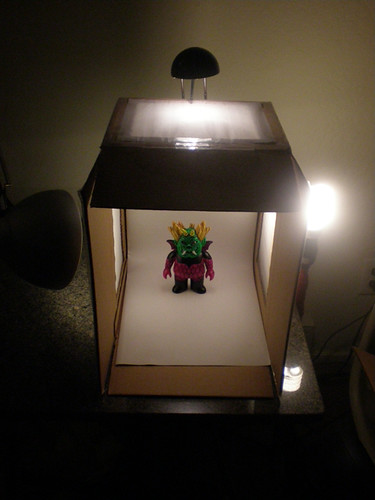 Here's a pic of it in action: 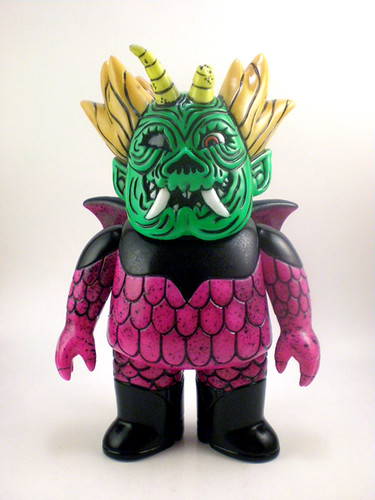
|
|
| Page 1 of 1 | All times are UTC - 8 hours [ DST ] |
| Powered by phpBB © 2000, 2002, 2005, 2007 phpBB Group http://www.phpbb.com/ |
|